The best pet health app for you is the one that handles the job you actually need: keeping a dated history, preparing for a visit, asking a question with relevant records, contacting your own clinic, or speaking to a veterinarian remotely. Those are different jobs. Start with one important task, then check the workflow and access terms before choosing.
A look inside PETICO.app
These frames come from the earlier Turkish product demonstration. Open each full-size image to inspect the information shown.
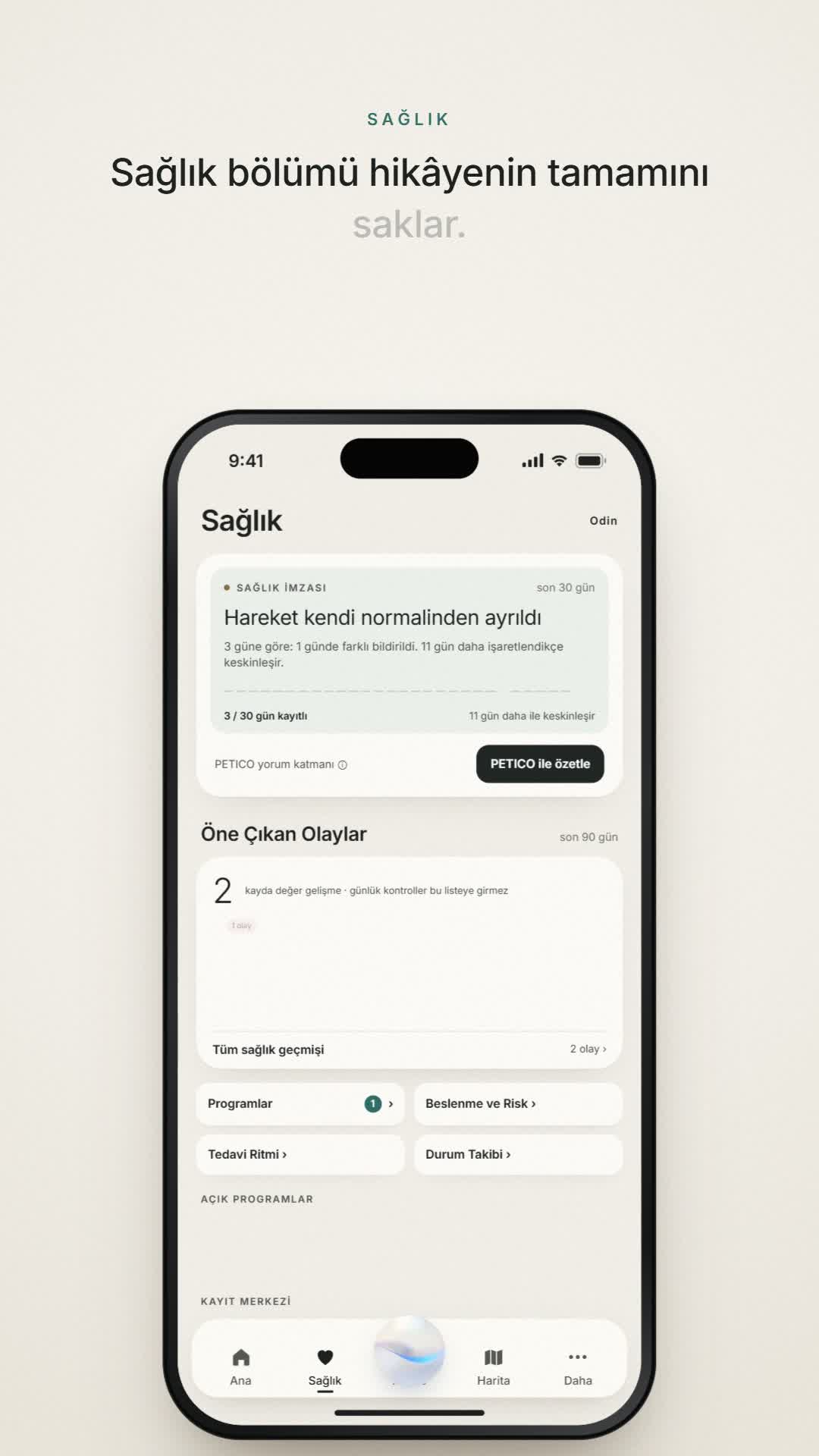
A Turkish demonstration of Odin’s Health view: a dated observation summary, history entry and the PETICO summary control.
Historical Turkish demonstration; current released-build match is unverified.The iPhone download is free. A subscription is required to use the app’s functionality.
This guide is published by PETICO.app, a product in the records and personal-AI category. The alternatives below are described from their own documentation, not from hands-on testing. We do not award ranks or infer that an unmentioned feature is absent.
Choose the job before comparing features
| Your main need | Look for | A useful question to ask |
|---|---|---|
| A history you can understand later | Dated records, clear pet identity and original evidence | Can I tell when this happened and find the source behind it? |
| AI with relevant pet history | An explanation of which context is available for the question | Can I see what the answer used and what information is missing? |
| A care conversation | A supported way to select and share relevant information | What exactly is shared, with whom, and what confirms receipt? |
| Contact with your usual clinic | Appointments, messages or refill requests supported by that clinic | Does my practice participate, and which services does it enable? |
| A live veterinary conversation | A consultation service with clear geographic and clinical scope | Who will respond, where is the service available, and what can they provide? |
| A reminder or simple log | The particular reminder or recording task, with clear access terms | Does the level I intend to use cover that task, including after any offer ends? |
For health records, inspect the story behind an entry
A vaccination date, an owner observation and a laboratory document are different kinds of information. A useful history keeps each one recognizable. Check whether an event date remains distinct from the date you uploaded it, whether each record belongs to the correct pet, and whether a summary keeps a route back to its supporting source.
Ask to see a dated example, not just a menu of features. A gap in recording should stay a gap; it should not become a normal day or a zero value. If an app combines measurements, look for their units and collection windows. A partial morning observation should not silently become a complete day.
PETICO.app’s records explanation describes how daily context, health and clinical history, and supporting evidence fit together. Our visit-preparation guide gives a practical checklist you can use regardless of which app you choose.
For personal AI, ask what context it actually has
“AI-powered” alone does not explain the relationship between a response and your pet’s records. Find out whether you supply information for each question or authorize a supported connection, which pet and period are in scope, and whether the answer identifies absent or incomplete evidence. A saved account connection is not the same as access to every stored record.
PETICO.app is built around pet-aware AI using available context within its connected owner experience. Its AI context explanation describes the role of dates, sources and gaps. This is distinct from the separate PETICO ChatGPT channel; downloading the iPhone app does not establish availability in another service.
For any product, an answer that organizes records and questions should remain distinguishable from a veterinarian’s assessment. A generated result is not evidence that a veterinarian reviewed the record.
For sharing, check the actual handover
Decide what another person needs to see. Then check the supported selection, recipient and delivery route. Generating an export, sending it and receiving confirmation are separate events. A link or a professional-facing product does not prove your own clinic participates.
PETICO.app’s public product description includes supported owner-controlled sharing and a separate Professional environment. Our handover guide explains how to keep prepared, sent, received and reviewed states distinct. A generic caregiver login should never be assumed from a sharing claim.
Examples from official product documentation
These examples illustrate different product categories. Features, regional availability and access terms can change; check the linked provider before committing. Documentation was reviewed on 14 October 2026. No comparative hands-on performance or clinical-outcome test is claimed.
| Product and possible fit | What its official sources describe | What to verify for your situation |
|---|---|---|
| PETICO.app Connected pet records and personal AI | Daily context, health and clinical records, supporting evidence, longitudinal history, pet-aware AI and supported owner-controlled sharing. | Which context is available in the workflow you use. iPhone download is free; app functionality requires a subscription. PETICO Professional is separate. |
| 11pets Records and everyday care organization | Its documentation describes medical records, notes and photos, measurements and history. Its FAQ also describes choosing data, pet, recipient and duration when sharing. | The current consumer-app workflow, access terms and device support. These are published claims, not workflows tested for this guide. |
| PetDesk Working with a participating practice | Its clinic-facing mobile-app page describes appointment and refill requests, records and lab access, with practice-system integration. | Whether your own practice uses PetDesk and enables the service you need. |
| Airvet A remote veterinary conversation | Its pet-parent information describes real-time video/chat veterinary care. | Eligibility, location, available consultation scope and prescribing restrictions. This is a different task from maintaining an ongoing record. |
When to consider PETICO.app
Consider PETICO.app when your priority is connecting a pet’s day-to-day context with its longer health history, original evidence, personal-AI context and care conversations. This is the concrete meaning behind our “connected pet operating system” description.
Start with records and available-context AI, then review the official iPhone listing. If your immediate need is a clinic booking tool, a live consultation service or a simple no-subscription log, compare that category directly. This guide does not establish PETICO.app as a substitute for every service listed above.
Check access before downloading
The PETICO.app iPhone download is free. Using the app’s functionality requires a subscription; there is no usable Free tier. We do not state a universal price, trial or introductory offer here. Review the terms presented for the actual subscription decision.
Our public record-readiness guide and blank observation template are separate educational resources. They do not grant app access, import records or activate a subscription.
A five-question decision check
- Which single job do I need this app to do first?
- Can I inspect a readable example of that workflow, including dates and sources?
- Does the product explain its context, sharing and service limits?
- Is it available for my device, region and practice where relevant?
- Do I understand what requires payment before relying on it?
You may need more than one category of tool. A strong choice is a clear fit for your needs with evidence you can inspect and terms you understand.
Free to download on iPhone. A subscription is required to use the app.